The Cue-Sheet Myth: A Plan Cannot Predict Every Moment
A live event cue sheet can keep operators aligned: define clear triggers, name who decides, and make changes easier to call during a performance.
A live event cue sheet should help operators act together, not try to script every unexpected pause. Give each department a shared trigger and a clear route for raising a problem, and the document becomes a working tool rather than a second schedule.
Build a shared cue language
Give each cue a short, unique name and use it consistently across the stage manager’s copy, lighting console notes, audio list and headset brief. A cue called “Presenter entrance” in one place and “Guest walk-on” in another forces the crew to translate while listening.
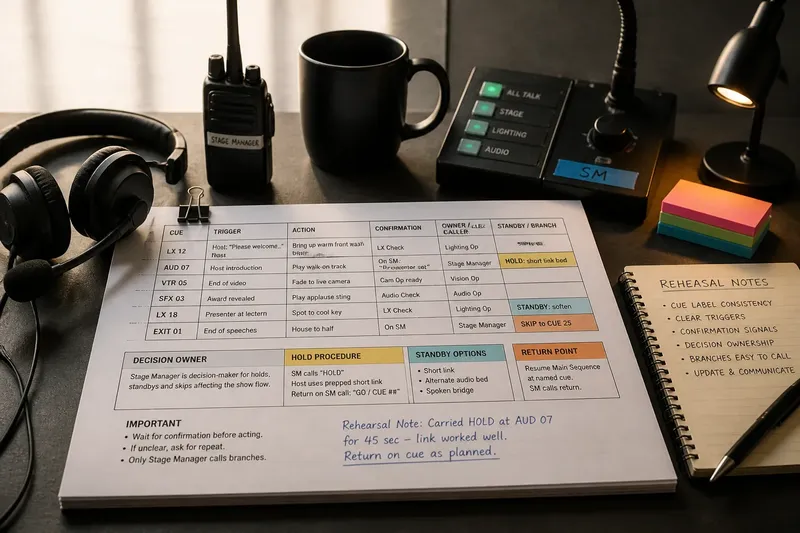
Write the action and its observable trigger together. “LX 12: bring up the warm front wash on the host’s words ‘Please welcome’” tells the operator what to do and when; “brighten for speaker” does not.
Before doors open, compare the cue labels across documents and mark any mismatch for correction.
Give each department its view
A shared naming system does not mean every operator needs the same page. The lighting operator needs the look and trigger; the audio operator needs the playback or microphone action; the stage manager needs the calls and confirmations that connect them.
Keep the full production note separate from the live cue sheet. Put essential action beside its cue, and reserve longer explanations for the briefing where the team can read them without a transition under way.
Separate triggers from checks
A trigger tells an operator to act. A check confirms that a condition is ready. For example, “play the walk-on track on the host’s introduction” is a trigger, while “presenter is in position” is a check.
Write the relationship plainly: “On the host’s introduction, play the track only after the stage manager confirms the presenter is set; otherwise hold and use the named standby link.” This makes the required signal visible and avoids leaving the operator to guess.
Use a confirmation channel that the relevant crew can actually see or hear, such as a headset call or an agreed hand signal. If the signal is unclear, ask the stage manager to repeat it rather than acting on assumption.
Assign decision ownership
When a live choice affects more than one department, name one person to make that choice. Other crew members can supply information, but operators should not have to settle authority over headset while a cue is waiting.
Describe the available options in direct language. A stage manager might be authorised to hold an entrance, call a prepared spoken link or skip to a named section. The production team should agree those options before the event and tell the people expected to carry them out.
Keep the decision close to the cue it affects. A distant note can be easy to miss during a transition.
What should a cue sheet clarify?
What makes a good trigger?
Choose an event that caller and operator can identify in the same way, such as a spoken phrase, the end of a video or a clear stage-manager signal. Avoid impressions such as “when the room feels ready”.
When does a moment need a standby?
Name a standby when a likely change can be prepared in advance, such as a short hold, alternate audio bed or spoken bridge. State who calls it and how the team returns to the main sequence.
Which changes need rehearsal?
Rehearse a change that affects several people’s timing, positions, sound or light. A minor hold may need only a verbal check, while an alternate entrance calls for the relevant crew to practise the hand-off.
What should change after rehearsal?
Revise a cue when the trigger proved unclear, the call arrived too late or the team lacked information. Change the specific wording or signal that caused difficulty instead of adding detail without a clear purpose.
Keep branches easy to call
Use a short label such as “HOLD”, “SKIP” or “STANDBY”, then state the trigger, caller and return point. Put the instruction where the operator needs it, not inside a long paragraph that must be searched during a live transition.
Say you are preparing a small awards event. The final presenter is delayed in a corridor, while the host is on stage and ready to continue. The cue sheet names the stage manager as decision-maker, directs them to call “HOLD” and use a prepared short link, then specifies a return cue once the presenter is in position. The resulting action is observable: the host fills the pause, the departments hold the entrance, and the stage manager calls the agreed restart.
Keep the branch proportionate to the situation. If the same variation recurs during rehearsal, revise the main sequence rather than adding another layer of conditional notes.
Protect the live copy
Use consistent cue names, clear department labels and enough spacing to scan the page quickly. Put urgent conditions beside the cue they affect, and make sure the caller can identify the current version at a glance.
When a change is agreed, update the master copy and tell every person whose action or call has changed. Mark superseded printouts clearly so an old page cannot quietly become a second plan.
During rehearsal, record the exact point of confusion and correct it in the document. A cue sheet earns its place when the team can identify the next action and the person authorised to call it, even when the event takes an unexpected turn.