Run of Show or Open Schedule? Two Ways to Pace a Gathering
Run of show or open schedule? Choose the format that fits your content, performers and production needs, then brief the crew with a usable plan.
A run of show or open schedule should follow the event’s content and production dependencies. If speakers, cues or technical changes must happen in order, use a run of show; if activities work independently, an open schedule can give the team room to operate them in parallel.
The distinction is about how the work is organised, not how visitors move through a venue. A run of show gives contributors and crew a shared sequence. An open schedule defines what is available and when, without requiring every activity to begin together.
Start with dependencies
List what must happen before something else can begin. A lighting cue may depend on a performer reaching a mark; a demonstration may depend on a technician resetting equipment; an announcement may need a presenter and interpreter ready together. Those links point towards a sequenced plan.
Next, separate dependencies from preferences. A contributor may prefer a particular slot, but the event may still work if the slot changes. By contrast, a video that introduces a panel’s subject may need to precede the discussion. Marking the difference helps you build a schedule that can absorb adjustments without breaking the programme.
Write each item on a card or in a spreadsheet, then note its lead, required equipment, setup and what must happen immediately before and after it. The resulting list makes hidden handovers easier to spot.
When run of show fits
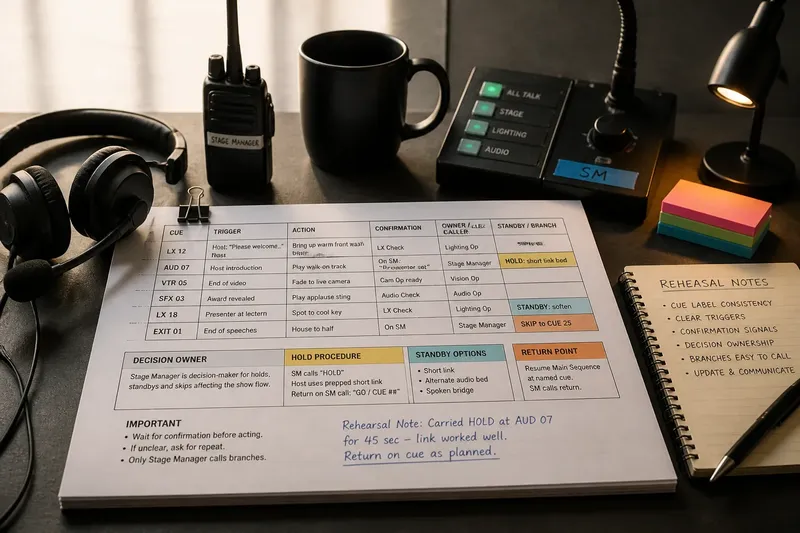
A run of show suits performances, ceremonies, presentations and sessions with linked content. It records the order of programme items alongside the cues the team needs: who calls each transition, which microphone is live, when a slide changes and what the next contributor needs before entering.
Make the document useful to the people operating it. Include a named role rather than a vague instruction such as “sound team”, and distinguish a cue from an approximate time. If a segment may overrun, state which later item can move and which must stay fixed.
Share the same current version with the stage manager, technical operators, presenters and relevant venue staff. A last-minute change should reach everyone whose action depends on it, not just the person editing the document.
When open scheduling fits
An open schedule is useful when activities can operate independently, such as an exhibition, a staffed information point or a demonstration that can be repeated. Set clear operating windows and identify the person responsible for opening, pausing and closing each activity.
Do not treat “open” as a substitute for production detail. A display may need a daily check; a workshop may require a reset between groups; a staffed station may need cover during breaks. Put those tasks in the crew plan even if visitors see only a simple listing.
For repeating activities, state the start times or the joining rule clearly. “Demonstrations run throughout” is misleading if the equipment needs a reset or the presenter takes a break. Tell the team when an activity is actually ready to receive participants.
Compare production needs
Choose the format by looking at dependencies, staffing and how changes affect other work. This comparison keeps the decision focused on delivery rather than appearances.
- Linked content: Check whether one item supplies information needed by the next. If it does, use a run of show; if not, consider an open schedule.
- Technical cues: Check whether lighting, sound, projection or scenery changes rely on a precise order. If they do, record a sequenced cue plan; if equipment can stay ready, schedule its operator across an open window.
- Contributor availability: Check whether a performer or speaker must be present for a particular handover. If so, set a fixed slot and brief the caller; if several contributors can operate independently, assign separate windows.
- Reset work: Check whether an activity needs materials replaced or equipment cleared. If each reset takes a dedicated crew action, schedule it between sessions; if the activity can continue without a reset, state who monitors it.
- Change authority: Check who can approve a timing change. If several departments are affected, name one decision-maker and a communication route; if only one activity changes, let its lead update the relevant crew and listing.
- Contingency: Check what happens if a contributor or piece of equipment is unavailable. If the next item depends on it, name a fallback or a hold cue; if other activities can continue, identify which lead can keep them running.
Which schedule fits?
What belongs in a run of show?
Include the sequence, responsible lead, cue, required equipment and handover for each item. Add notes for delays, holds and any segment that cannot move without affecting another part of the event.
How should an open schedule show crew duties?
Record each activity’s operating window, assigned lead, setup and reset tasks, plus who covers breaks. Keep these production instructions in the crew document even if the public programme uses shorter descriptions.
Can an event combine both formats?
Yes. Keep linked performances or announcements in a run of show, while assigning independent displays or drop-in activities operating windows. Make the boundary clear in the crew briefing so nobody assumes an open activity has a fixed cue.
What should change when a segment runs late?
Use a pre-agreed decision rule: identify which later items may shift, which cues must remain in order and who can call a hold. Tell affected leads through the agreed channel, then update the master schedule so the team works from the same version.
Work a hybrid plan
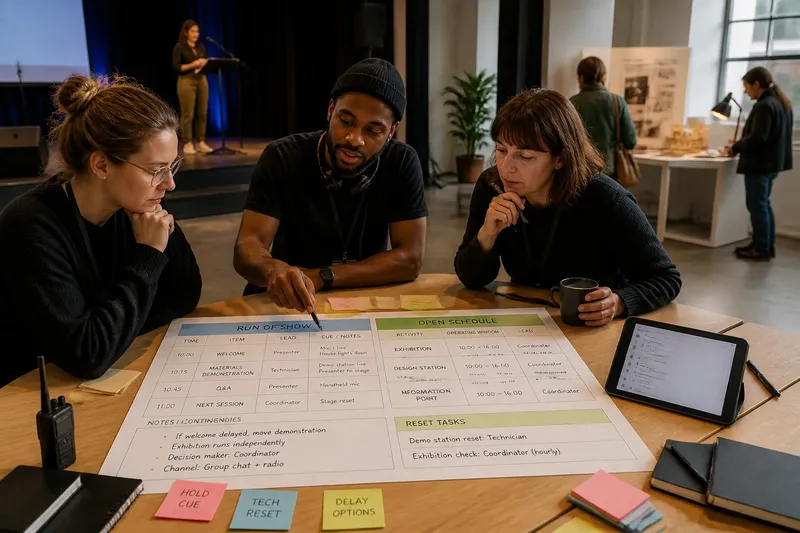
Say you are planning an invented community design event with a welcome, a live materials demonstration and an exhibition. The welcome must introduce the demonstration, while the exhibition can operate independently. A hypothetical crew has one presenter, one technician and a venue coordinator; these are planning inputs, not claims about a real event.
First, list the welcome before the demonstration because the presenter uses it to explain the process. Second, assign the technician to prepare and cue the demonstration after the welcome, with the coordinator confirming the space is ready. Third, schedule the exhibition as an open activity with the coordinator responsible for opening it and checking its display. Fourth, decide that a delayed welcome moves the demonstration but does not delay the exhibition. The resulting plan is a run of show for the linked stage items and an open operating window for the independent display; the trade-off is that the coordinator must manage both the display and the timing update.
Write that decision into the shared crew brief. If the exhibition instead depended on an explanation delivered during the welcome, it would no longer be fully independent and would need a linked start or a repeated introduction.
Brief the handovers
For every change, state the outgoing lead, incoming lead and signal that confirms the handover. A spoken “stand by” may suit a stage cue; a radio call may suit a technical reset. Use the method your team has agreed, and avoid relying on an unspoken assumption that someone else is ready.
When plans change, identify who edits the master schedule and how the update reaches the crew. Keep version names or timestamps consistent across printed copies and shared files, and remove superseded copies from the working area.
Before the event, walk through the schedule with the people responsible for each cue. Ask each lead to identify their first action, the signal they are waiting for and what they will do if that signal does not arrive. A precise answer reveals where the plan needs another instruction.
Choose the working format
Use a run of show when content, cues or contributors depend on a known sequence. Use an open schedule when activities can operate separately and the production team can manage their individual windows.
A run of show or open schedule is only useful if the crew can act on it. Put dependencies, ownership and change authority in the plan, then brief the people responsible for each handover before doors open.